|
||||||||||||||||||||||||||||||||||||||||||||||||||||||||
|
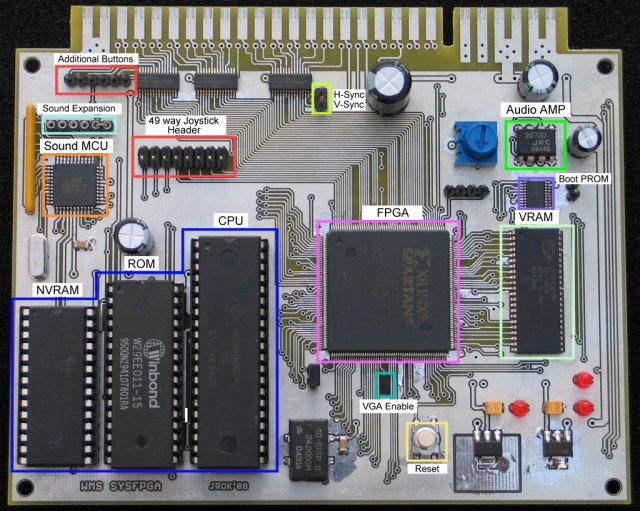
The Beta test board v0.01 |
|||||||||||||||||||||||||||||||||||||||||||||||||||||||
|
|
|||||||||||||||||||||||||||||||||||||||||||||||||||||||
|
||||||||||||||||||||||||||||||||||||||||||||||||||||||||
|
What
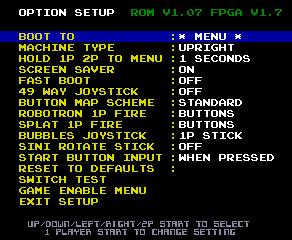
are the options ? |
Option Name |
Value |
Function |
|
|
BOOT TO: |
Game or Menu |
Select the game the
hardware boots into. After
self test it can either display the selection menu or start a specific game
up automatically. |
|
|
MACHINE TYPE |
UPRIGHT/COCKTAIL |
Set the type of cabinet
the game is running in. |
||
|
HOLD 1P+2P TO
MENU |
OFF/1,2,4
seconds |
How many seconds the 1P
+ 2P start buttons should be held down before the game restarts back at the
selection menu |
||
|
SCREEN SAVER |
ON/OFF |
After 10 minutes of
inactivity on the menu, the game goes in to the running ostrich screen
saver mode. |
||
|
FAST BOOT |
ON/OFF |
Forces
the game to skip the ‘rug pattern’ self test when a game starts. |
||
|
49 WAY
JOYSTICK |
ON/OFF |
Enable use of a 49 way joystick with
blaster or sinistar. |
||
|
BUTTON MAP SCHEME |
STANDARD |
STANDARD MODE – 1P and 2P joystick plus player 1
buttons 1 through 6 are used. |
||
|
ROBOTRON 1P FIRE |
BUTTONS / 2P STICK |
In upright mode player 2 stick is used for
the up/down/left/right firing for Robotron. |
||
|
SPLAT 1P FIRE |
BUTTONS/ 2P STICK |
In upright
mode player 2 stick is used for the up/down/left/right throw for
splat. This option has no effect in cocktail
mode |
||
|
BUBBLES
JOYSTICK |
1P STICK / 2P STICK |
Use either the left
side, 1P joystick or right side 2P joystick for bubbles |
||
|
SINI ROTATE STICK |
ON/OFF |
Sinistar joystick is
rotated 90 degrees. This is to allow
play in a horizontal cabinet. |
||
|
|
START BUTTON INPUT |
WHEN PRESSED |
WHEN PRESSED – soon as
the 1P start or 2P start buttons are pressed the button press it passed to
the game immediately. ON RELEASE – when the 1P
or 2P button is pressed it’s passed to the game ONLY when the button is
released. |
|
|
|
RESET TO DEFAULTS |
|
Holding the button down
for 5 seconds resets all the menu values to their defaults. |
|
|
|
SWITCH TEST |
|
Test screen for showing
state of all inputs, used for testing joystick & button wiring. |
|
|
|
GAME ENABLE MENU |
|
Allows games & the
setup screen to be disabled from showing on the start menu. |
Game Specific Pinouts
|
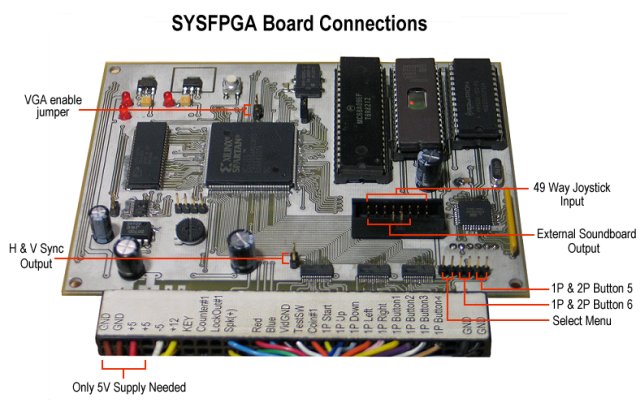
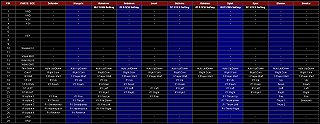
This grid shows the JAMMA pinout of the
board and the game controls. |
|

- In cocktail mode the option "ROBOTRON 1P
FIRE" and "SPLAT 1P FIRE" have no effect. The player two
inputs follow the normal input for.. player 2.
- In upright mode most only Joust and Splat use
player 2 inputs, the other games expect player 1 & 2 to use the same
controls.
- Sinistar & Blaster when the when 49 way
stick is 'OFF' then the standard 8-way joystick input is translated into
a 49 way directions for the game.
What's Next ?
- Nothing new at the minute….
A few video captures
These videos are captured s-video output
from one my RGB to NTSC video encoder boards using a generic Philips SAA7130
based PCI capture card.
|
Options Menu |
Stargate |
Blaster |
|
|
|
|